Perfection Is a Strawman
AI agents and people both make mistakes. Judge the agent by comparing its results with the process it would replace.
Give your team back the hours lost to workarounds. Our independent forward deployed engineers build MCP servers, AI agents and agent workflows. We connect stubborn legacy systems and modernize brittle software. We choose the tools to fit your mission.
Four people built Indicium, a working hackathon MVP, in 13 days.
See the hackathon evidenceRobert Melton, EVP, leads the first conversation. Nicole Mazkour, CEO & Founder, joins when acquisition structure is central.
Meet who you’ll talk withEmployees earn their share through tenure and performance.
See capabilities and company informationThe latest additions and substantive updates to our work, tools and writing.
AI agents and people both make mistakes. Judge the agent by comparing its results with the process it would replace.
 Case studiesUpdated
Analyze richer graphs in Go: compact and disk-backed storage, typed relationships across years, temporal patterns and calibrated anomaly signals. Public MIT source.
AI is cutting the cost of software every year. Keep control of your data, get the right to modify the code, and keep the exit open instead of betting a decade on one vendor.
See working software, the decisions behind it and the tests that put those decisions under pressure.
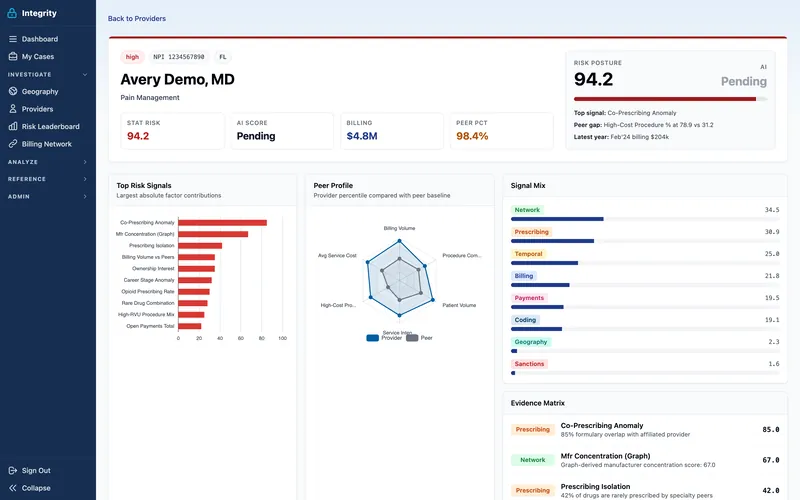
Historical screens from Indicium’s hackathon build, then called Integrity, running on its built-in demonstration data. The provider shown is fictional.
Working hackathon MVP
Four people built Indicium in 13 days, winning the ACT-IAC 2026 CMS track. Its public-data risk signals are inspectable. The retrospective study supports further testing, not production-readiness or realized-savings claims.
Read the Indicium case studyRFPing · In development
Acquisition specialist and CEO Nicole Mazkour uses our internal AI tools to build RFPing and open pull requests. Engineers test, refine and integrate her changes. Domain knowledge reaches the product directly; engineering review stays in the path.
Explore the RFPing build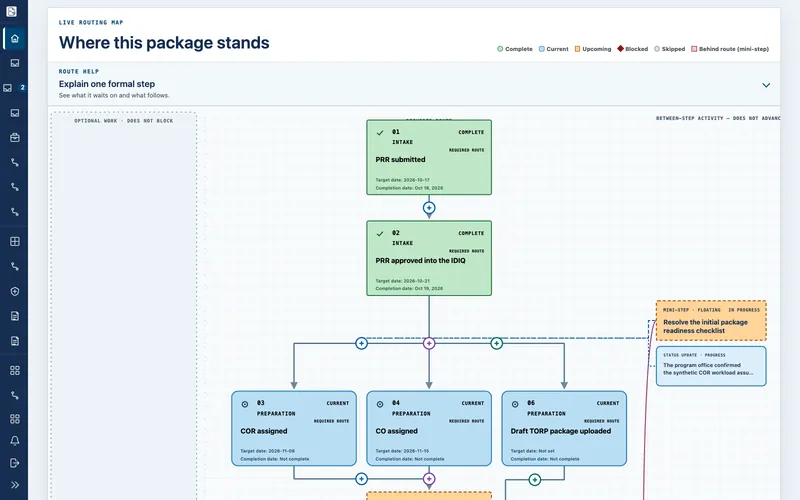
GraphWizard, SwiftMac, and our other open-source work make the engineering visible. Read the code, check the documented scope, and see what we learned.
Explore our open-source workBring the problem. We build something useful to react to, then agree on what earns the next step. Work directly with named engineers remotely, through working sessions, demos and feedback that fit your availability.
Proof of concept
React to a focused demo or proof of concept. Unresolved access or feasibility may call for a plan first.
Pilot
Agree on users, tests, operating conditions and approvals, with checkpoints to change course or stop.
Production
Complete required reviews and acceptance. Leave your team the knowledge and transition material to keep it useful.
Five tools for the paperwork and deadlines that eat your day. Your inputs stay on your device.
See all free tools and the Executive Order guide
Available · 100% client-side Office pre-check
Check Word and PowerPoint structure; download located findings. PDF is not supported.
Use the Document accessibility pre-check tool
Check document titles, Word heading levels and header-row flags, and PowerPoint title placeholders and visual descriptions. The tool lists its coverage and the checks that still need a person. It does not change your file.
This implemented pre-check helps authors prepare for review. Automated structure checks cannot certify Section 508 conformance or replace manual testing. PDF and content outside the stated scope are not checked.
Available · 100% client-side metadata preflight
Inspect Office metadata, comments and hidden-content signals before release review.
Use the Metadata leak checker tool
See what metadata the tool found, where it found it, and what to check before sharing. Download a report with values excluded by default, or choose to include them. Your original file stays unchanged.
Findings prompt review. This tool does not establish a safe release, detect visual-redaction failures, or replace your agency’s review and redaction process.
Available · 100% client-side CONUS worksheet
Calculate CONUS lodging, travel-day meals and deductions from reviewed rates.
Use bundled standard CONUS rates for FY 2026–2027 or enter reviewed work-location rates for each date. See every calculation and download the worksheet, entirely in your browser.
This checks stated lodging and M&IE arithmetic. It does not select a locality, determine eligibility, include taxes or other travel costs, or submit or approve a voucher.
Available · 100% client-side date calculator
Count days, inspect the ledger and download a calendar entry.
Use the Deadline calculator tool
Choose before or after, include or exclude the start date, and review the complete count. The bundled holiday rules cover 2025–2030. Everything runs in your browser.
This is traceable date arithmetic for you to check against the instruction that applies to your work. It does not infer an agency rule, filing cutoff or final-day adjustment.
Available · 100% client-side Office starters
Create an editable Word brief, meeting notes or PowerPoint briefing.
Use the Document starters tool
Add an optional title, purpose and office/team name. The browser packages reviewed starter structures locally, with logical headings or real slide placeholders and a review guide.
Starters need Office accessibility checks and manual review after editing. They do not certify conformance, select a records schedule or authorize disposition. Required agency templates and records guidance take precedence.
Download the sample, run the checker and inspect its report. No account, email gate or file upload.
Dig into our writing, free tools and engineering evidence. Follow the question that brought you here.
The full collection is listed below. Search and filters are available when JavaScript is enabled.
21 resources
AI agents and people both make mistakes. Judge the agent by comparing its results with the process it would replace.
AI essay · Robert Melton
AI is cutting the cost of software every year. Keep control of your data, get the right to modify the code, and keep the exit open instead of betting a decade on one vendor.
Acquisition essay · Robert Melton
AI is cutting the cost of producing software, but not the cost of getting every stakeholder to agree. Parley is in development, starting with project management and acquisitions management.
Product note · Robert Melton
Every step up the programming ladder was resisted, and every one leaked. AI is the next rung. The skill that survives it is understanding the data.
Engineering essay · Robert Melton
AI is already in the work. The harder part is making sure it solves a real problem and that a named person remains responsible for the result.
Field note · Nicole Mazkour
Decoy is planned to create realistic synthetic data inside the customer boundary, with customer review before any output leaves. Its Intelligrit implementation still needs to be built and validated.
Product note · Robert Melton
The 13-day deadline forced a four-person team to decide what had to work, how it would be tested, and what a judge could inspect.
Delivery evidence · Robert Melton
Start with a workflow people can use on its own. Add platform scale when measured demand or operating needs call for it.
Acquisition guidance · Robert Melton
Check Office structure and metadata, count deadlines, work out travel math or build a document starter. Explore source-linked Executive Order reports to prepare your next question. Each tool and guide explains its coverage and limits.
Workbench note · Tools and EO reports
A browser-only structure pre-check for Word (.docx) and PowerPoint (.pptx), with located findings and a downloadable report. Files and findings stay on your device. PDF is not supported yet.
Available · 100% client-side Office pre-check
A private Word and PowerPoint preflight for metadata, comments, tracked changes, hidden-text or slide flags, notes and embedded-part signals. Visual redactions and PDF files are not checked.
Available · 100% client-side metadata preflight
Work through nightly CONUS lodging, travel-day M&IE and provided-meal deductions. Enter reviewed daily rates when work locations change.
Available · 100% client-side CONUS worksheet
Count calendar days, weekdays or regular federal workdays. Check each counted or skipped date and download a calendar entry.
Available · 100% client-side date calculator
Build an editable Word decision brief or meeting notes, or a five-slide PowerPoint briefing. Review the included authoring and records prompts before sharing.
Available · 100% client-side Office starters
Read source-linked Executive Order reports with agency impacts, required actions, deadlines and practical questions for your team.
Independent report by Intelligrit
Hackathon evidence: a four-person team built Indicium in 13 days and matched 37 high-scoring providers to public enforcement cases involving $500M+.
Read the scope and evidence
Analyze richer graphs in Go: compact and disk-backed storage, typed relationships across years, temporal patterns and calibrated anomaly signals. Public MIT source.
Read the scope and evidence
See how Robert’s daily work as a blind developer shaped SwiftMac, our Labs and open-source project for native macOS speech.
Read the scope and evidence
See what we learned from SwiftMac and how we are applying it to Omnivox, our evolving cross-platform speech server.
Read the scope and evidence
In-progress Intelligrit Labs R&D: a bounded native interface over an authoritative server-run system, with accessibility built in.
Read the scope and evidence
Public R&D evidence: one senior engineer used AI to turn 12 million words into traceable structured data and a working map in two days.
Read the scope and evidence
Bring the task that keeps getting stuck, the deadline you’re facing, or the system your team keeps working around. We’ll help you find a useful first move and what it would take to reach production.


